(to paraphrase a dead white male)
Blogger has yanked my chain one time too many. I hate to change . . . well, anything, really, but this may have been the last straw.
For the indeterminate future, all activity you would normally find here, will be going on at votefordavid.wordpress.com. I regret going to a host that gives you ads, but this site isn't for you anyway and I don't want to fight with robots when I should be venting my spleen about the goings-on in the world around me. So long, Blogger. Too bad you turned out to be a pain in the ass.
Showing posts with label Computers. Show all posts
Showing posts with label Computers. Show all posts
Monday, April 15, 2013


Friday, April 12, 2013
Round 2...FIGHT!
So the Stupidest Thing Ever got a little stupid-er. I noticed that I was still showing up as David VoteFor instead of VoteForDavid. A well-phrased Google search brought me to How to Change Your Display Name on Blogger which is exactly what I wanted to do in the first place...and I couldn't! As I went to follow the instructions, I noticed they were wrong, and that I had an option to change to a different profile. Google in their typical not-evil-but-awfully-control-freak-ish way switched me to a Google+ profile instead of a plain jane Blogger profile because they know better. The instructions were wrong for the Google+ profile, but as soon as I changed back to the profile I WANTED to use in the first place, they gave me an option to pick my display name. BAM. How hard was that?
So I went to update the Stupidest Thing Ever post and...couldn't. Of all my postings, that's the one that I can't edit. Whiskey Tango Hotel, over. So now you get a whole new post on the subject, whoopeedee!
So I went to update the Stupidest Thing Ever post and...couldn't. Of all my postings, that's the one that I can't edit. Whiskey Tango Hotel, over. So now you get a whole new post on the subject, whoopeedee!
Wednesday, April 10, 2013
That Was The Stupidest Thing Ever.
...or at least, the stupidest thing this week so far.
I lost access to an email account I used to log in to this h'yer blog. I made a fancy new gmail account for the purpose. It made a new Google Account for me with the same username, for which I have exactly no use. I put my desired username in but I put a typo in there somehow. It showed up onscreen the way I didn't want it to show up.
So I just spent the last two and a half hours running in circles trying to get blogger to accept a new author with the name I wanted to use in the first place. It involves yet another new non-gmail address AND another new Google account.
The process goes: log in as user A, then send an invitation to user B to be an author. User B accepts and it works like magic. Except it didn't. Blogger would not show the new author in the dashboard for the old author after I accepted the invitation. Two hours later and ready to quit, I logged in to my new gmail account as a last-ditch desperation move to see if anything showed up there. It had a bunch of emails saying I had accepted invitations with different email addresses.. THAT gmail account is THE account for this blog. I was logging out of blogger but not out of gmail somehow even though they are the same account, and the OLD Google account was still logged in. So when I used my new email account to accept an invitation to contribute to VFD, the OLD Google account as accepting it.
What a cluster[deleted]. Way to be, Google. Finally I figured out to log out of my google stuff in THREE different locations, log in to the new google account, and THEN accept the invitation. Worked. Finally. [deleted]. It sure would have been nice to be getting some productive work done, but somehow this knowledge is nowhere to be found on the internet:
LOG OUT of Google, Gmail, and Blogger, and log in to the Google account of the NEW author you want to invite, BEFORE accepting the invitation.
 The gray-headed guy tried to do this last year and he died trying. What a needless hassle.
Google, I don't want, need, or care about EITHER of these Google Accounts. I'll NEVER use Google+ and I don't want personalized ANYTHING. I use you for Blogger and web searching. Leave me alone with this jive already!
I lost access to an email account I used to log in to this h'yer blog. I made a fancy new gmail account for the purpose. It made a new Google Account for me with the same username, for which I have exactly no use. I put my desired username in but I put a typo in there somehow. It showed up onscreen the way I didn't want it to show up.
So I just spent the last two and a half hours running in circles trying to get blogger to accept a new author with the name I wanted to use in the first place. It involves yet another new non-gmail address AND another new Google account.
The process goes: log in as user A, then send an invitation to user B to be an author. User B accepts and it works like magic. Except it didn't. Blogger would not show the new author in the dashboard for the old author after I accepted the invitation. Two hours later and ready to quit, I logged in to my new gmail account as a last-ditch desperation move to see if anything showed up there. It had a bunch of emails saying I had accepted invitations with different email addresses.. THAT gmail account is THE account for this blog. I was logging out of blogger but not out of gmail somehow even though they are the same account, and the OLD Google account was still logged in. So when I used my new email account to accept an invitation to contribute to VFD, the OLD Google account as accepting it.
What a cluster[deleted]. Way to be, Google. Finally I figured out to log out of my google stuff in THREE different locations, log in to the new google account, and THEN accept the invitation. Worked. Finally. [deleted]. It sure would have been nice to be getting some productive work done, but somehow this knowledge is nowhere to be found on the internet:
LOG OUT of Google, Gmail, and Blogger, and log in to the Google account of the NEW author you want to invite, BEFORE accepting the invitation.
Google, I don't want, need, or care about EITHER of these Google Accounts. I'll NEVER use Google+ and I don't want personalized ANYTHING. I use you for Blogger and web searching. Leave me alone with this jive already!
Monday, March 18, 2013
Well, [deleted] You Too, Yahoo!
Yahoo! mail is trying to get kicked out of my life. First they switch to a suck-ass new layout/template/format thing despite howls of protest from users - on one account. The other two accounts I have with them - still on the old template.
Then on this one account, they started bugging me to give them a phone number. Sure, right they pinky-swear they won't spam the phone. No.
Now, after I correctly enter my password, they come up with s security question. The reason for added security? I'm logging in from an unrecognized device. You know, the same one I used the last time I checked my email with this account? Yeah, that one. They don't recognize it.
So I put in the right answer three different ways because god-only knows what the answer was that I put back in 2007 or whatever.
Then on this one account, they started bugging me to give them a phone number. Sure, right they pinky-swear they won't spam the phone. No.
Now, after I correctly enter my password, they come up with s security question. The reason for added security? I'm logging in from an unrecognized device. You know, the same one I used the last time I checked my email with this account? Yeah, that one. They don't recognize it.
So I put in the right answer three different ways because god-only knows what the answer was that I put back in 2007 or whatever.
Unsuccessful Login: Account Locked Temporarily.
This account is temporarily locked for 12 hours because of security concerns. Please try signing in later or contact online Yahoo! Customer Care for further assistance.
Aaaand the Customer "Care" form requires more information about the account holder. F if I know. I made that information up on the spot when I signed up for the free email account. If they don't let me in in 12 hours, I'll just tell my one contact that uses this particular account, to use another account.
Gee, wouldn't it be convenient if they had a phoooone they could text me a code to unlock the account?
This is passive-aggressive and I won't have it. I only like yahoo! because they're free and I got to pick my user names. If they want to become a free pain in my ass, I'll just kick them out of my life like I did to AT&T.
Wednesday, February 27, 2013
Yet Another Irritation. Thanks, Microsoft.
VirtualStore
is a pain in my tuchus. If you don't know what this is, count yourself
fortunate. I'll save you the gory details, but Microsoft screwed yet
ANOTHER class of users by making Virtualstore active by default -with a flawed implementation- in
Windows 7. Thanks, jerks.
At least it isn't costing me money. Unlike this guy, who brightened my day by taking some extra time to give quality answers to the trolls an lusers who can't understand.
Friday, February 8, 2013
This is What "Hopelessly Many" Bad Sectors Looks Like
A while ago, I had a flaky computer at home. Among the many things I tried to use to get it backworking was gparted (on the UBCD). gparted said it couldn't do what I wanted it to do, because it had bad sectors. How many bad sectors?
This was very bad. So when I got the hard drive replaced, I called it "bad"
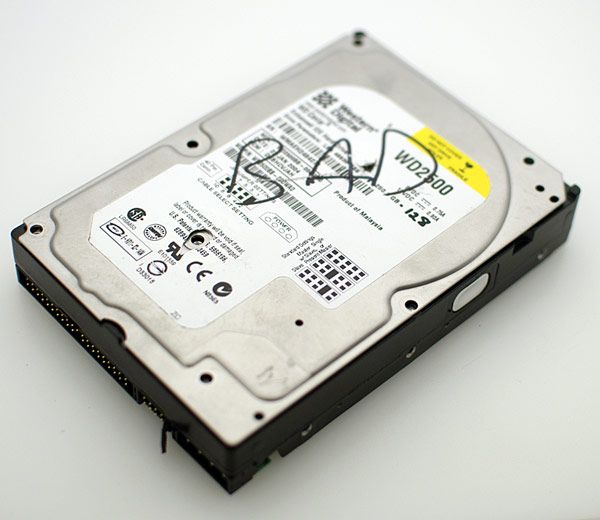 and then decided "what the [deleted]" and opened it. Inside a hard drive should be 100% pristine ultra-clean cleanliness. I was shocked to see this on the top platter:
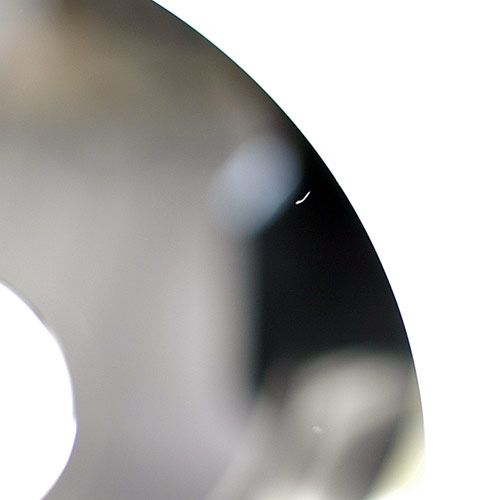
(that's about a 2mm-long fleck of dust)
Then I turned it to catch the light a different way. Realize please that the actual discs in a hard disc drive are little round mirrors and are entirely featureless as far as you can see with your eye . . . normally . . .
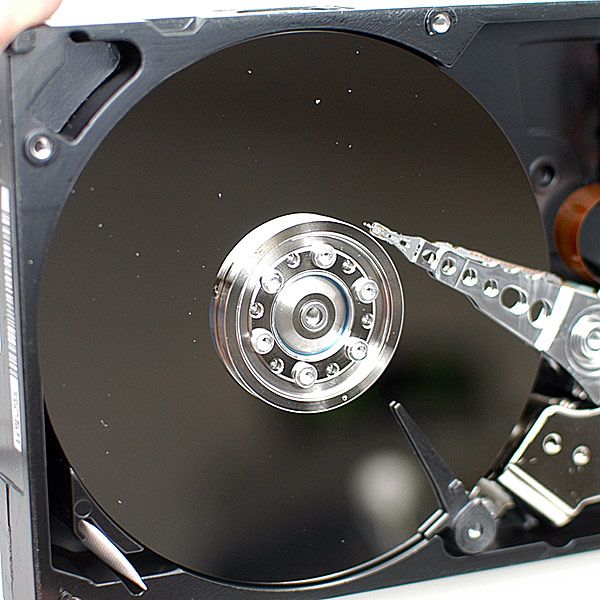 What does "hopelessly many bad sectors" mean? It means you better have a working backup already, because your drive is hosed. These white flecks of dust resulted in system instability and random crashes and locking up/freezing. You wouldn't notice this small amount of dust on your spectacles. On the platters of a hard disk, it is catastrophic.
"hopelessly many"
This was very bad. So when I got the hard drive replaced, I called it "bad"
(that's about a 2mm-long fleck of dust)
Then I turned it to catch the light a different way. Realize please that the actual discs in a hard disc drive are little round mirrors and are entirely featureless as far as you can see with your eye . . . normally . . .
Monday, January 21, 2013
Windows Easy Transfer . . . IS!
I
recently (months ago, this is a note from back when it happened) "upgraded" my work computer, from Windows XP (Professional,
32 bit) to Windows 7 (ultimate, 64 bit). Because I
was going from 32 to 64 bit, I had to start from scratch. Regardless of
the wisdom of doing so, I could have done in-place upgrades from XP to
Vista to Seven, but only from 32bit to 32-bit. When you eventually make
the move to 64 bit, you will have to reinstall Windows from scratch, starting
over with a formatted hard drive. NONE of your programs or settings
will transfer.
Unless...
I
used Windows Easy Transfer on my still-running XP installation and ran
the program again on my now-running 7 installation. It worked
P
E
R
F
E
C
T
L
Y
!!!
I
had to do a song-and-dance with Adobe to activate Photoshop, but even
then, after I finally re-installed it on the new OS, all my settings
were there. Not just the Workspace (God bless Adobe for workspaces!)
but my custom actions were there. My bookmarks transferred to a new OS
and a new version of both my internet browsers. The desktop icons were even there. It's just like using my
old computer, except for the custom Windows Theme.
I
never thought I'd say it but God bless Microsoft (for this anyway). If
you are migrating to a new version of Windows and do not use Easy
Transfer, you are shooting yourself in the productivity.
Make Firefox STOP ZOOMING with Zcroll Wheel!
- I use firefox all day every day.
- I use my scroll ring to navigate webpages
- Firefox likes to use some phantom input plus my scroll ring to zoom in/out of web pages. All by itself, not touching the keyboard, even.
- This makes me bozonkers
I had tried changing some other
things in about:config, but this is what finally seems to have fixed it
for me:
zoom.maxPercent set to 100 (vs. 300)
zoom.minPercent set to 100 (vs. 30)
This
means, try as it might to zoom on a page, it can't do it with the
scroll control on your mouse. It still zooms with ctrl-+ and ctrl-- but
then when you want to go back to 100% all you have to do is ctrl-scroll
in EITHER direction! This is a beautiful thing, my friends.
Thursday, January 10, 2013
Free Adobe Photoshop, From Adobe . . . Legally Until Further Notice
At work, I use Adobe Photoshop CS2. It came from a retail package that is sitting on my shelf right now, with the serial number on the box. I have been happily working with my 100% legit, activated, non-pirated CS2 for ages. Then I upgraded my computer at work to a much-fancier one and installed a 64-bit copy of Windows to take advantage of many-times-larger RAM capacity in the new machine. This means reinstalling and reactivating Photoshop. It went like this:
Then a few days later, everybody from Forbes to my boss were talking about how Adobe was just plain GIVING AWAY CS2. It looks like one of a few things happened:
I think the very best thing Adobe can do now is to make a statement like Adobe forum member stagesound suggested:
but I can't blame them if they don't. We'll see, I guess.
- Install CS2 using serial number from the box
- Attempt to register with Adobe
- Fail
- Try again
- Fail again
- Call the phone number from the registration dialog box onscreen
- Phone robot says go to Adobe.com and use my Adobe account to access a special download page
- Visit download page
- Stare slack-jawed as I see that ALL the 8 year-old Adobe software is apparently free (for me, the existing customer) to download, with activation serial numbers right there on the page
- Uninstall CS2 as directed
- Reinstall with the new package from Adobe.com
- Select "Never Register"
- Continue to use Photoshop CS2 to make gobs of money.
Then a few days later, everybody from Forbes to my boss were talking about how Adobe was just plain GIVING AWAY CS2. It looks like one of a few things happened:
- They decided to crush ALL interest in the GIMP and other free/lower-cost image editing software by slipping an old, but still very useable version of CS2 out into the wild. Canny, and very good thinking!
- They don't care anymore and could give a [deleted] what you do with CS2, but to get us to stop calling their support line they slapped this up there and STILL don't care
- They put it up as a good-will gesture for legitimate customers, but didn't change the EULA or make a specific statement that it is only for paying customers, and then realized it was too late to change it now
I think the very best thing Adobe can do now is to make a statement like Adobe forum member stagesound suggested:
"Due to a screwup with our activation server, we inadvertently published an activation-free version of CS2 along with the serial numbers to make the software usable. Since we've effectively given CS2 away, we may as well make it official - good luck to all new Adobe software users. You can now dump your open source or low-budget alternatives, and once you've used your CS2 for a while, we hope you'll consider trading up to the later versions which you'll enjoy even more!"
but I can't blame them if they don't. We'll see, I guess.
Friday, January 4, 2013
A Moment of Panic
Sitting at my computer, I noticed some serious crunching-data sounds from the hard drive. I looked over and the firewall indicated inbound and outbound traffic and my heart started to think about going pitty-pat at what the [deleted] my computer might be doing as I was reading the news. . .
. . . then I realized the sound is the humidifier smashing water into steam in the next room, and the internet activity is loading my headline news stories.
WHEW!
. . . then I realized the sound is the humidifier smashing water into steam in the next room, and the internet activity is loading my headline news stories.
WHEW!
Sunday, December 30, 2012
Dell Inspiron 600/600m Laptop Computer Loose Touchpad Surround Trim Plastic Repair
The Dell Inspiron 600 is getting a little old these days and it is starting to show. I had one come through the shop, then another and another, with one particularly annoying sign of old age: the cute little colored plastic piece around the touchpad is loose enough to make a tapping noise when you tap the touchpad to click (or double click) on something, and it makes the whole touchpad feel like it is going to fall out of the computer.
This is how you can fix that loose trim piece, permanently.
Tools required:
Start by unplugging the power cord and removing the battery, and set yourself up at a static-free workstation (ideally) or at least plan on not-moving for a while and have everything handy. This repair was successful at my regular table in a carpeted area, with me wearing cotton clothes and touching the screw on a power outlet nearby before working to dissipate any large static charges. These computers seem relatively static-tolerant but Murphy says you will zap your motherboard if you are not carefeul. You CAN kill your computer if you attempt this work at a not-static-free workstation.
You have been warned.
Click any image to see it full-sized.
Unscrew the screws that hold the keyboard-surround/touchpad bezel in place. Set them aside in a pile, they are all the same length.
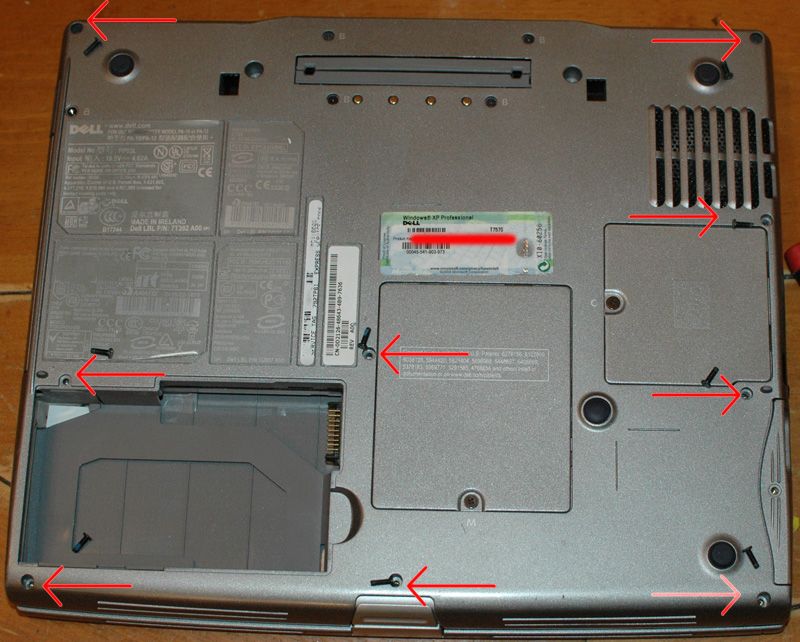
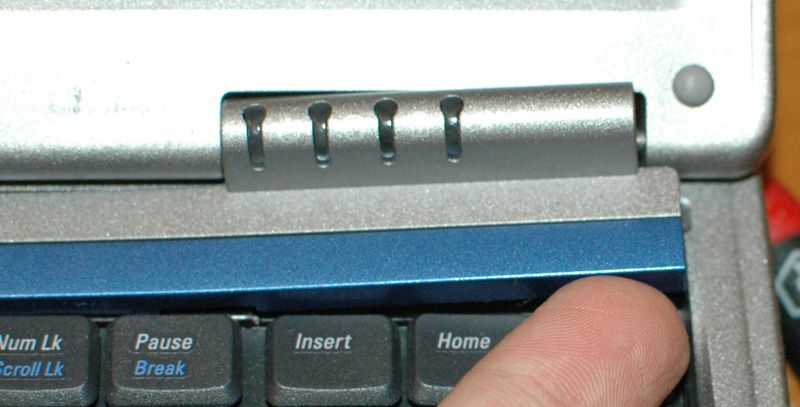
Open the computer all the way flat so the display is laying as close to your bench top as possible. Gently insert your small flathead screwdriver in the little notch at the right end of the trim piece over the keyboard. It takes some moderate wiggle/pull-up forces but this piece is only snapped in place.
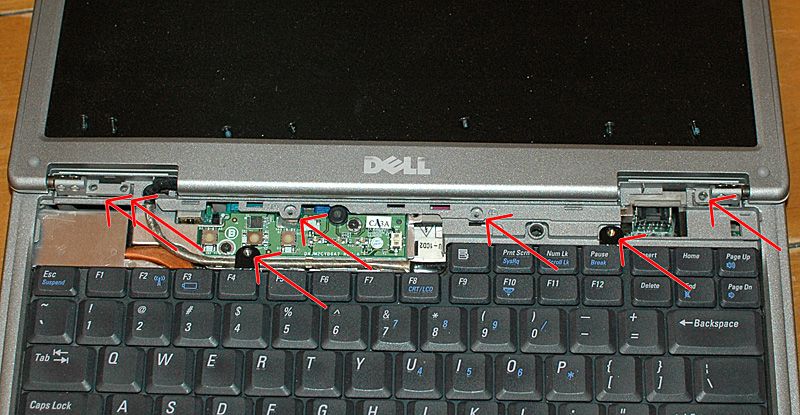
Pull all these screws also. Set them aside more carefully, as they are NOT all the same length.
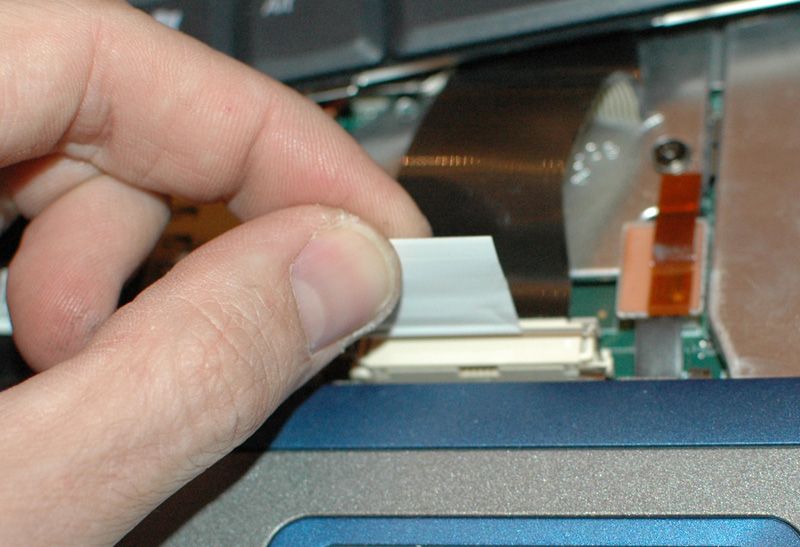
The keyboard will pull right out now; use the pull tab on the connector, do NOT pull up on the cable!
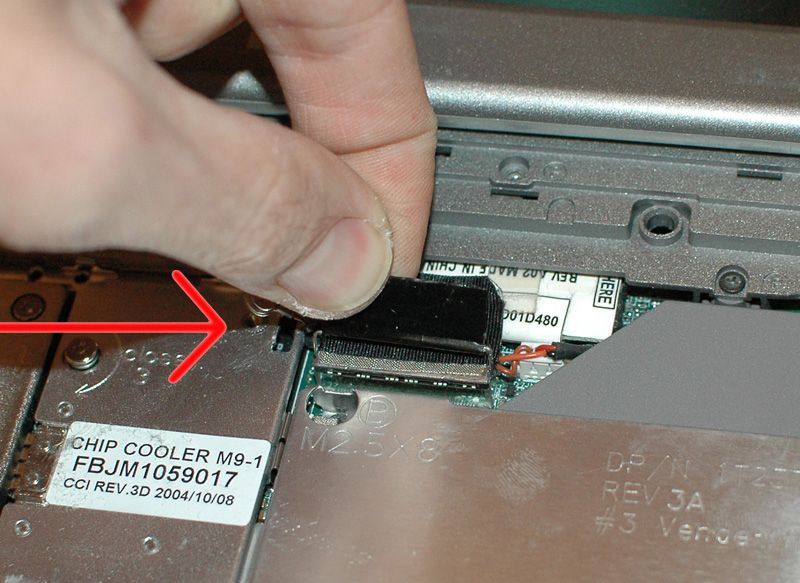
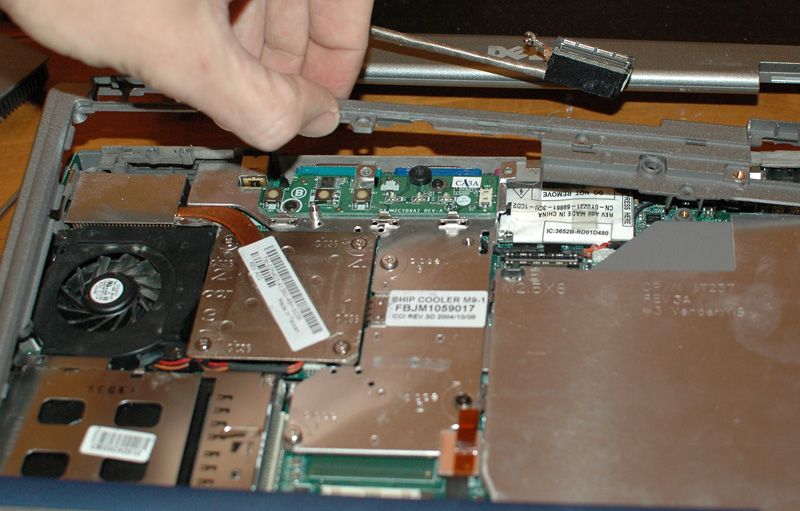
Unscrew the grounding strap by the video cable connector and gently pull up on the tab (not the cable) to remove the connector. The entire top/display module is now loose. Set it carefully aside.
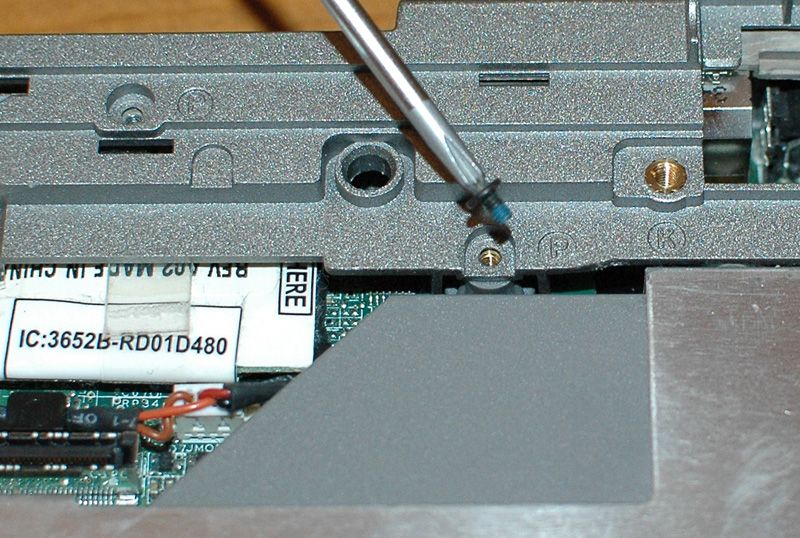
One more screw was hiding under the keyboard.
Gently disconnect the touchpad connector.

Nothing else besides plastic 'snap' retaining tabs holds the top plastic piece in place. Gently tug and pull, and the plastic all the way around the top of the computer will pop right off. Do not be alarmed that this sounds like the end of the world. Unlesss you are pulling TOO hard, it is just the snap tabs popping loose with no damage - but don't force it. If you are pulling too hard make sure you got all the screws out, or you will end up buying a new top panel on ebay!*
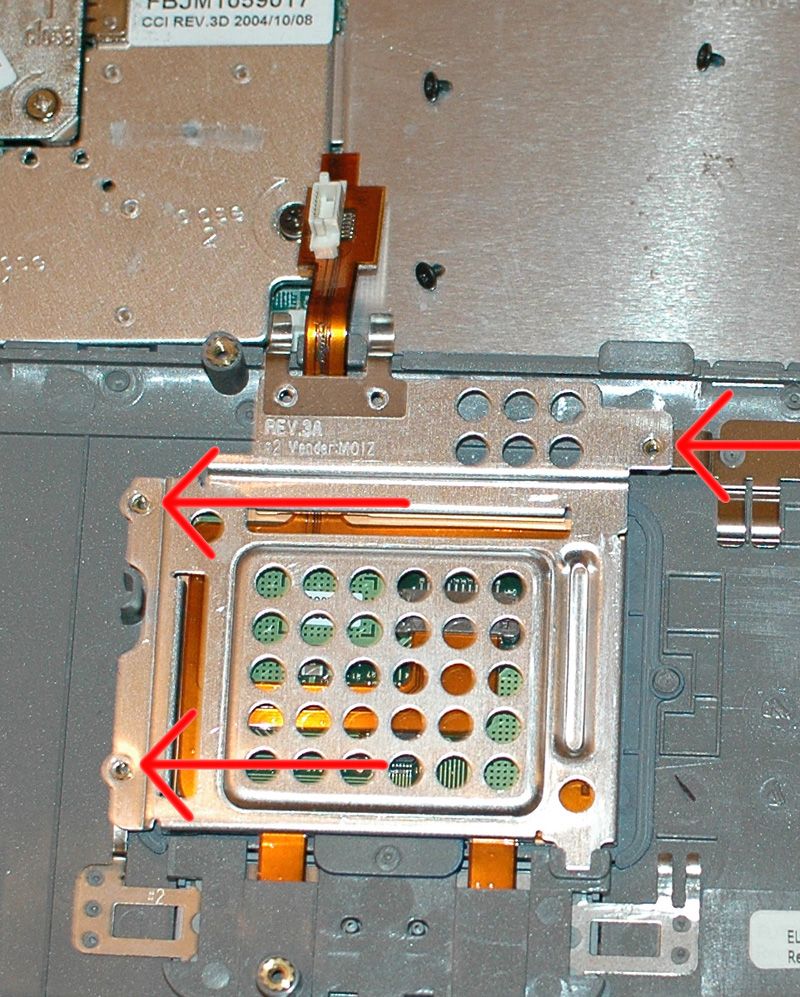
Three screws hold a metal shield in place under the touchpad. This shield may do double-duty as a brace for the touchpad, but on this computer it was not touching the plastic (or at least, not pressing hard enough to keep it firmly in place).
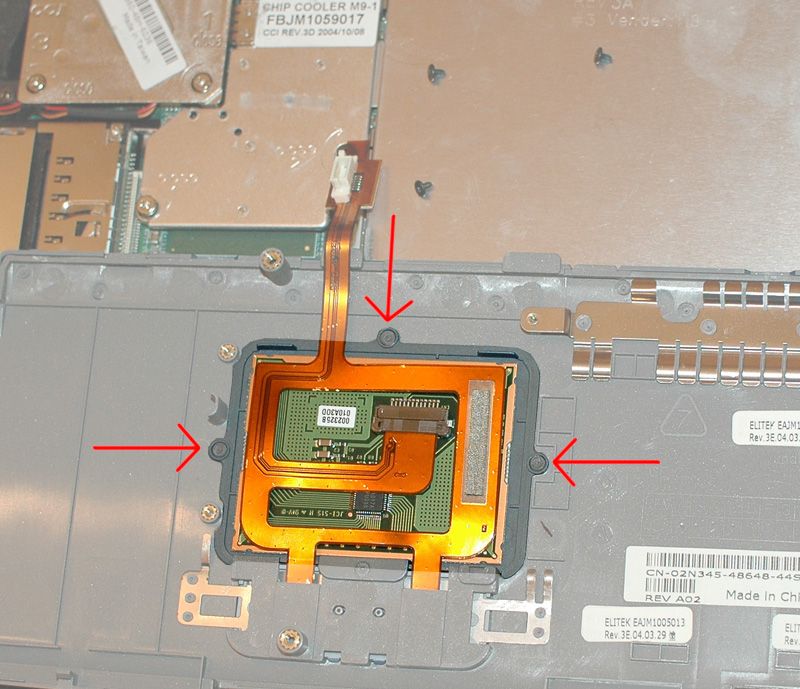
The factory heat-staked the colored trim surrounding the touchpad in three places. Sometimes that was enough, but sometimes the trim piece works loose.
This kind of plastic was heated and injection-molded to form it into a computer part. Re-heating it and adding a little bit of plastic to your computer part will not harm anything when done properly. Just keep the heat as low as it will still melt the plastic (I used 600ish degrees F, and worked quickly) and be VERY careful as you are working.
If you have never done this, practice on a piece of scrap plastic first to avoid destroying your computer! My technique was to cut a little bit of scrap plastic and pick it up with the tip of the soldering iron. Then I stirred the new plastic on the to-be-repaired area with the tip of the iron, ever so slightly melting the trim panel and keyboard bezel, and the new scrap of plastic, into one lump. Be very careful not to melt through the bezel or trim piece! Smooth the finished bead of plastic with the tip of the soldering iron after is the plastic has cooled and hardened.
I used a bit of scrap plastic from another (dead) computer and a gentle touch, and welded the trim panel to the keyboard bezel in several new places, plus I reinforced the three heat-staked spots.
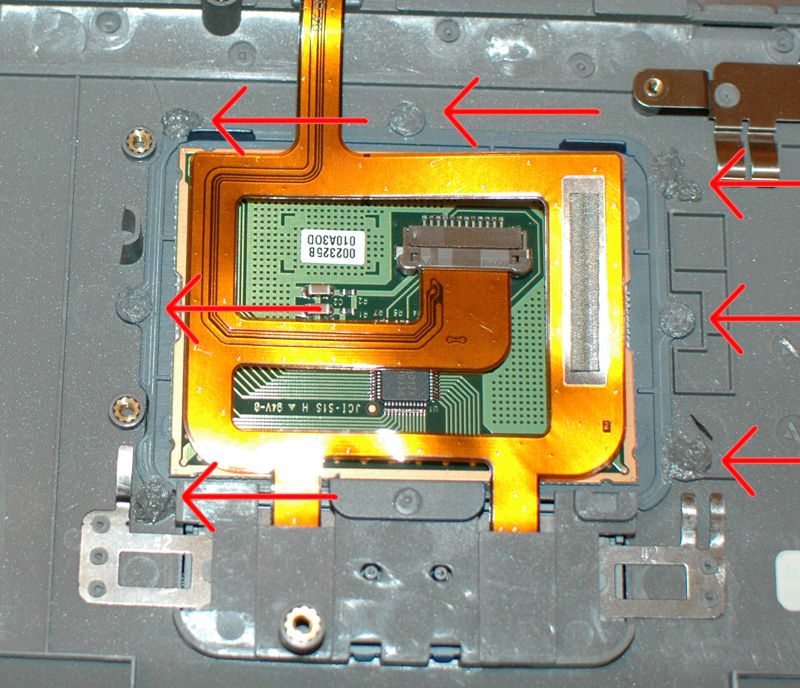
The touchpad flops out, and I welded a couple more spots near the bottom. Be careful here, because one false move and you will ruin the touchpad! Also you need to be careful about the dimensions of your weld spots. Gently trim the welds if they are too big, until it all fits together perfectly again.
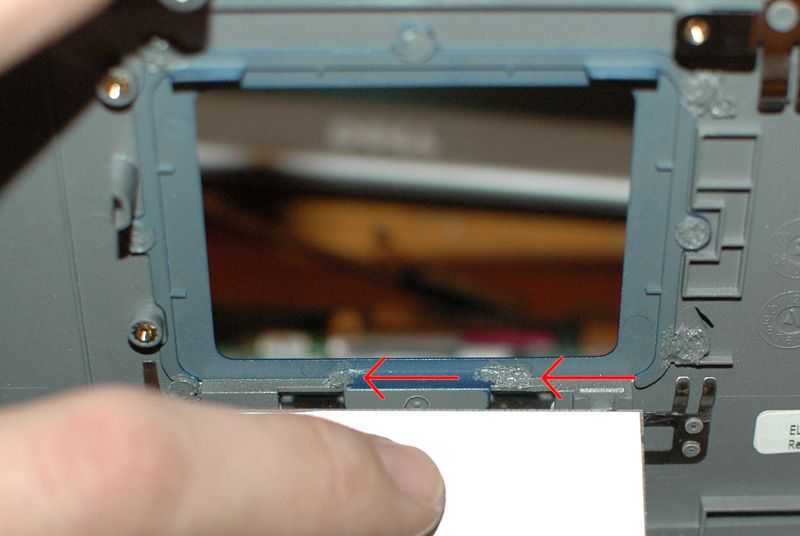
That's it, you're done. Put it back together. Assembly is the reverse of disassembly.
You will notice that now, when you use the touchpad and tap by the edges, it feels like one solid piece of plastic. It is. Congratulate yourself.
********
*Speaking of eBay, if you haven't yet gone to eBay and purchased a 1.6GHz or 1.7GHz processor for yours Inspiron, do that next after you do this.
Be sure NOT to get any processor besides the Pentium-M, and be sure it has a 1M cache and 400MHz bus speed, to prevent buying an incompatible CPU! Also buy more RAM for your computer while you are there. Both of these upgrades should be less than $20 and you would be surprised how much of a boost you can get. If you are rocking a 1.3GHz CPU and 256 or 512MB of RAM, it will be like a whole new machine once you max it out! Before you install the new processor, be sure to visit dell.com and download/install the latest BIOS and you SHOULD be able to use a faster processor no problems - but be sure to buy from a seller that accepts returns, just in case.
This is how you can fix that loose trim piece, permanently.
Tools required:
- #0 Philips screwdriver, preferably one that is strongly magnetized
- Similarly-small flat-head screwdriver
- Fine-tipped soldering iron
- A little scrap of extra plastic
Start by unplugging the power cord and removing the battery, and set yourself up at a static-free workstation (ideally) or at least plan on not-moving for a while and have everything handy. This repair was successful at my regular table in a carpeted area, with me wearing cotton clothes and touching the screw on a power outlet nearby before working to dissipate any large static charges. These computers seem relatively static-tolerant but Murphy says you will zap your motherboard if you are not carefeul. You CAN kill your computer if you attempt this work at a not-static-free workstation.
You have been warned.
Click any image to see it full-sized.
Unscrew the screws that hold the keyboard-surround/touchpad bezel in place. Set them aside in a pile, they are all the same length.

Open the computer all the way flat so the display is laying as close to your bench top as possible. Gently insert your small flathead screwdriver in the little notch at the right end of the trim piece over the keyboard. It takes some moderate wiggle/pull-up forces but this piece is only snapped in place.

Pull all these screws also. Set them aside more carefully, as they are NOT all the same length.

The keyboard will pull right out now; use the pull tab on the connector, do NOT pull up on the cable!

Unscrew the grounding strap by the video cable connector and gently pull up on the tab (not the cable) to remove the connector. The entire top/display module is now loose. Set it carefully aside.

One more screw was hiding under the keyboard.

Gently disconnect the touchpad connector.

Nothing else besides plastic 'snap' retaining tabs holds the top plastic piece in place. Gently tug and pull, and the plastic all the way around the top of the computer will pop right off. Do not be alarmed that this sounds like the end of the world. Unlesss you are pulling TOO hard, it is just the snap tabs popping loose with no damage - but don't force it. If you are pulling too hard make sure you got all the screws out, or you will end up buying a new top panel on ebay!*

Three screws hold a metal shield in place under the touchpad. This shield may do double-duty as a brace for the touchpad, but on this computer it was not touching the plastic (or at least, not pressing hard enough to keep it firmly in place).

The factory heat-staked the colored trim surrounding the touchpad in three places. Sometimes that was enough, but sometimes the trim piece works loose.

This kind of plastic was heated and injection-molded to form it into a computer part. Re-heating it and adding a little bit of plastic to your computer part will not harm anything when done properly. Just keep the heat as low as it will still melt the plastic (I used 600ish degrees F, and worked quickly) and be VERY careful as you are working.
If you have never done this, practice on a piece of scrap plastic first to avoid destroying your computer! My technique was to cut a little bit of scrap plastic and pick it up with the tip of the soldering iron. Then I stirred the new plastic on the to-be-repaired area with the tip of the iron, ever so slightly melting the trim panel and keyboard bezel, and the new scrap of plastic, into one lump. Be very careful not to melt through the bezel or trim piece! Smooth the finished bead of plastic with the tip of the soldering iron after is the plastic has cooled and hardened.
I used a bit of scrap plastic from another (dead) computer and a gentle touch, and welded the trim panel to the keyboard bezel in several new places, plus I reinforced the three heat-staked spots.

The touchpad flops out, and I welded a couple more spots near the bottom. Be careful here, because one false move and you will ruin the touchpad! Also you need to be careful about the dimensions of your weld spots. Gently trim the welds if they are too big, until it all fits together perfectly again.

That's it, you're done. Put it back together. Assembly is the reverse of disassembly.
You will notice that now, when you use the touchpad and tap by the edges, it feels like one solid piece of plastic. It is. Congratulate yourself.
********
*Speaking of eBay, if you haven't yet gone to eBay and purchased a 1.6GHz or 1.7GHz processor for yours Inspiron, do that next after you do this.
Be sure NOT to get any processor besides the Pentium-M, and be sure it has a 1M cache and 400MHz bus speed, to prevent buying an incompatible CPU! Also buy more RAM for your computer while you are there. Both of these upgrades should be less than $20 and you would be surprised how much of a boost you can get. If you are rocking a 1.3GHz CPU and 256 or 512MB of RAM, it will be like a whole new machine once you max it out! Before you install the new processor, be sure to visit dell.com and download/install the latest BIOS and you SHOULD be able to use a faster processor no problems - but be sure to buy from a seller that accepts returns, just in case.
Friday, December 7, 2012
Winning: Use IrfanView for First Cull.
If you are not using IrfanView as the default image viewing program on your PC, you are doing yourself a SEVERE disservice. Before you read the rest of this post, go to the IrfanView Official Homepage and download the program and the plugins, install the program, install the plugins, and let it associate all the file extensions with IrfanView. Double-click any image file and note that it opened more-or-less immediately. Hit the space bar on your keyboard and the next image is there. Hit backspace and the previous image is there. It works with pretty much all image file types, and can even read some partially-corrupted images.
I have been using IrfanView since the years when it actually mattered that the entire program can fit on a single floppy disk. It is one of the first programs I install on any new machine. I like it so much I actually donated my own money to support the program, and I NEVER donate to shareware/freeware authors.
Anyway, I just realized as I was sifting through a pile of images on my camera's memory card that when you hit DELETE on the keyboard, and it gives a confirmation dialog, and you hit Yes or the Enter key - it deletes the image as if you had deleted the file in Windows Explorer. My previous method of doing a first-cull to delete throwaway images was using the Filmstrip view in Windows Explorer, full-screen so it shows up a big image. With IrfanView, it can give a fullscreen image, and hitting control-H shows the actual pixels so you can see every last detail. Windows Explorer resamples in a not-great way but IrfanView shows a very clear image on my monitor. My life just got more efficient. Thanks to Jesus! (and to IrfanView!)
I have been using IrfanView since the years when it actually mattered that the entire program can fit on a single floppy disk. It is one of the first programs I install on any new machine. I like it so much I actually donated my own money to support the program, and I NEVER donate to shareware/freeware authors.
Anyway, I just realized as I was sifting through a pile of images on my camera's memory card that when you hit DELETE on the keyboard, and it gives a confirmation dialog, and you hit Yes or the Enter key - it deletes the image as if you had deleted the file in Windows Explorer. My previous method of doing a first-cull to delete throwaway images was using the Filmstrip view in Windows Explorer, full-screen so it shows up a big image. With IrfanView, it can give a fullscreen image, and hitting control-H shows the actual pixels so you can see every last detail. Windows Explorer resamples in a not-great way but IrfanView shows a very clear image on my monitor. My life just got more efficient. Thanks to Jesus! (and to IrfanView!)
Monday, November 19, 2012
Windows 8 Sales Unexpectedly Weak
- Take the greatest mass-consumed computer operating system in the last decade (arguably, Windows 7)
- Determine all on your own that right-frikken-now is the time for the world to begin using tablets instead of PCs or Notebooks
- Focus all your energy on a new operating system that combines the hopefully-greatness of the next generation operating system and the totally-useless-for-more-than-one-thing-at-a-time interface of a tablet and slash the price.
- Sit back and wait as the money totally fails to roll in like the tide.
The Windows 8 user interface is horrible on anything besides a small touch screen. If all you want to do is check your stocks real quick on your phone, then whatever. Me, personally, I have FOUR 22" monitors going all day every day and usually eight to twelve applications running in WINDOWS on the desktop, where I can see what each is doing with minimal overlap and interact with different programs by moving my cursor.
WindowS. As in, more than one thing displayed at a time. You know what windowS 8 can't do? Yessir that is correct. Aside from having a counter-intuitive interface for EVERYTHING, Microsoft has decided the new Windows does not need to give you the ability to effectivly multi-task with so many as TWO displayed windows on your quad-core computer with 8 gigabytes of RAM and enough video hardware to simulate a nuclear explosion. One thing displayed at once, because shut up that's why.
Thereby holding fast the time-honored Microsoft tradition of releasing a new operating system nobody wants or "upgrades" to, every-other OS they put out.
DOS: changed the world
Windows 3: meh
Windows 95/98 (same thing) changed the world
Windows Me/2000: ignored by the world
Windows XP: 40% of the world still uses it
Windows Vista: Unless a new computer came with it nobody bought it
Windows 7: What Vista should have been, a real winner
Window 8: sucks at using. Runs good, uses bad.
Way to fail, Microsoft. Here's hoping this bombs hard and fast enough that 9 goes back to what we are all used to, and willing to pay money to upgrade to: a desktop with a Start button and Metro interface onto the dungheap of /dev/null allstars.
Wednesday, November 7, 2012
"Well, [deleted]."
So I am trying to wipe the hard drive on a laptop with no optical drive. No problemmo! The Customizing UBCD page at ultimatebootcd.com has a two-line text command and a built-in program on the Ultimate Boot CD will automagically turn a formatted USB stick into a bootable Ultimate Boot . . . uh. . . Stick. This used to be a hassle with older versions of UBCD, but now it is dead simple and worked
PERFECTLY
on the first go. So I booted the laptop, changed the BIOS settings to boot from USB first and rebooted. It loaded the UBCD menu in frikken RECORD time and shaBAM here I am in Darik's Boot and Nuke ready to blast the data on my hard drive all to smithereens. So as usual I typed "autonuke" at the prompt and DBAN started a'wipin all the drives it saw. Including my shiny new UBCD-on-a-stick flash drive.
At this point, I said rather a naughty word. Then I was happy I had the Customizing UBCD page still open, and (after reformatting the USB drive in Windows Disk Management) I proceeded to REmake my bootable USB UBCD drive. Like a boss. Only perhaps, next time, I will tell DBAN just exactly WHICH drive to nuke.
Complacency will get you, and your flash drive software, killed.
PERFECTLY
on the first go. So I booted the laptop, changed the BIOS settings to boot from USB first and rebooted. It loaded the UBCD menu in frikken RECORD time and shaBAM here I am in Darik's Boot and Nuke ready to blast the data on my hard drive all to smithereens. So as usual I typed "autonuke" at the prompt and DBAN started a'wipin all the drives it saw. Including my shiny new UBCD-on-a-stick flash drive.
At this point, I said rather a naughty word. Then I was happy I had the Customizing UBCD page still open, and (after reformatting the USB drive in Windows Disk Management) I proceeded to REmake my bootable USB UBCD drive. Like a boss. Only perhaps, next time, I will tell DBAN just exactly WHICH drive to nuke.
Complacency will get you, and your flash drive software, killed.
Monday, October 1, 2012
Way to Be, Sony
It took a day, but I finally came to an important realization:
Sony could give a flying [deleted] about users who want to run 64-bit MS Vista on older laptops. You want drivers? Suck it! Because shut up, and buy a new PC already.
Okay, 32-bit it is. Who needs an extra gig o' ram anyhow?
Sony could give a flying [deleted] about users who want to run 64-bit MS Vista on older laptops. You want drivers? Suck it! Because shut up, and buy a new PC already.
Okay, 32-bit it is. Who needs an extra gig o' ram anyhow?
Sunday, September 23, 2012
P.S. The New Blogger Interface Sucks
To use. I'm pretty sure to the reader it looks the same but trust me on this end of the keyboard it is stupid.
Friday, September 21, 2012
SOLVED! How I Installed a Fresh Copy of Windows XP on a Toshiba Portege M200/M205 Notebook Computer
As a computer-related thing to do, this sucks. I spent a couple of days trying to work around it and researching, trying to find out what would and would not work - finding out the hard way what did not work. This is what worked for me.
You will need:
Done. Enjoy.
********
NOTE:
This might erase all your files and programs. You need to back up your stuff anyway. Do it now, while you are thinking about it!
Legal NOTE: I don't know if all these shenanigans are strictly in accordance with the Microsoft End User License Agreement, and I really don't care. I started with a tablet running this same OS, but had to wipe it to preserve confidentiality of a customer's data. I ended with a tablet running an installation of Windows that was activated with the key on the bottom of the computer.
You will need:
- Toshiba M200-series tablet/notebook PC
- Windows XP license key (look on the bottom of the computer)
- Windows installation CD (I used a Dell-branded OEM XP Professional SP2 reinstall disc)
- Separate computer capable of booting from an IDE drive
- Separate computer with Internet access, an empty USB socket, and a CD drive (can be the same separate computer)
- (maybe) 3.5" to 2.5" IDE connector adapter
- A USB flash ("thumb") drive
- #1 philips screwdriver
- Patience
Listen to the mustn'ts:
- Nevermind booting from an external CD or DVD drive, that will not work for you. There are statistically zero PCMCIA optical drives that the M200-series will boot from.
- Nevermind booting from an SD card. It can only read cards up to 1GB anyway, but you probably won't be able to get it to boot from an SD card. I tried using a Multimedia Card and it didn't work.
- Nevermind making an image to copy on the hard drive, this way takes just as long.
- The real kick in the stones: booting from a USB-anything is impossible
- Shut down the computer and flip it over. Unscrew the one screw retaining the hard drive bay cover. Remove the cover
- Remove the hard drive. This is a 2.5" IDE drive. I had to look around for a computer that can boot to an IDE drive anymore.
- Install the hard drive in the separate "host" computer. You may need to use a 3.5" to 2.5" IDE drive adapter
- Load the Windows XP installation CD into the optical drive and boot into the windows setup program. You may need to change your computer's BIOS boot priority settings so the CD boots before the hard drive
- Load windows normally to the notebook's hard drive in the host computer. You may need the license key, depending on which version of XP you install, and who made your the computer.
- Let windows FULLY install. This involves multiple restarts. Do NOT let it install updates from the Internet, because you will just have to install them again in a few minutes.
- Boot into your fresh Windows installation and eject/insert the Windows installation CD.
- When autorun starts, tell it to install, then tell it to perform an in-place "upgrade" installation (NOT a clean install!) It will copy some files and tell you it needs to reboot the computer. When it says it is about to reboot, hit escape to allow you to shut down gracefully (vs. yanking the power cable).
- Shut down the computer. Remove the hard drive. Install the drive into the notebook from which it originally came.
- Boot the notebook. If you are lucky, it will wake up and recommence upgrading Windows WITH the components you need to operate the Portege, instead of the drivers for the host computer.
- Depending on the installation media and the brands of the computers, you may have to use the Windows license key to proceed. I gave it a Tablet PC Edition key and it changed from Dell XP Pro to Tablet PC - very trick!
- You will not have any of the toshiba-specific drivers installed. Toshiba has ALL of these on their website. You will not be able to access the Internet from the tablet yet. Use your second computer with Internet access for the next step!
- For the M205-S810 (my computer) these are found here: Toshiba support website
- Download all the drivers to a USB stick.
- Install the drivers on the tablet. Start with the chipset and Common Modules drivers to let the others install properly. This involves dozens of reboots.
- Connect your network cable to the tablet and download all your Windows Updates. I had to download SP3 before Windows Updates would work properly.
Done. Enjoy.
********
NOTE:
This might erase all your files and programs. You need to back up your stuff anyway. Do it now, while you are thinking about it!
Legal NOTE: I don't know if all these shenanigans are strictly in accordance with the Microsoft End User License Agreement, and I really don't care. I started with a tablet running this same OS, but had to wipe it to preserve confidentiality of a customer's data. I ended with a tablet running an installation of Windows that was activated with the key on the bottom of the computer.
Wednesday, August 29, 2012
DIY/Solved! Move Windows AND Programs to New Computer for FREE
I'm ugrading my work computer. This is like a 50% power boost so it's worth some time. I put more time in it than I had to; this is a single-day affair if you're being slow and doing regular work in between telling the computer what to do. It went wrong in various ways, but finally I was able to transfer Windows XP from one computer to a totally different machine, with all my programs and files intact. When I finally found the proper method, it was super easy! NO extra software is required if you have two legit Windows licenses and a Windows installation CD.
First I used the Seagate-branded Acronis disk copying software to clone my hard drive in case something stupid happened (and it did, repeatedly, because I didn't do things in quite the right order the first go-round). Then I set the original disk aside and booted the clone hard drive, told XP to upgrade itself to the version of itself on the XP installation CD, then shut down the computer. Instead of letting it reboot and "complete" the update on my old box, I moved the hard drive to the new machine and let it continue with the "upgrade".
I had seen the MichaelStevensTech page with similar instructions but it was presented in an intimidating manner. Then I found this page at Development Stuff that covered it in more-accessible language.
Paul's Computer Service saved my bacon when it all seemed to work but hung at a black XP logo splash screen saying "please wait". It wanted a newer version of Internet Explorer than was on my XP installation CD. Boot into safe mode, install IE, install chipset drivers, reboot, activate, download a couple hundred megabytes of updates and we're done!
It works like a champ now. Thanks everybody!
********
Travails along the way:
First, I tried the dead-easiest way: (clone the HDD and) slap the hard drive into the new PC. Believe it or not, this HAS worked for me in the past when the PCs were close-enough to the same configuration. This looked initially encouraging, but it ended up in an endless reboot cycle, only getting as far as the splash screen before restarting. Trying the whole thing again with a Repair Installation of XP also looked promising, but also ended in an endless reboot loop. In safe mode it would get as far as a 7B stop error (STOP! I can't read the hard drives, hoss!). I tried this a couple times and killed the boot sector on the disk somehow. I changed the BIOS SATA setting to Legacy (ATA also worked) and got past the 7B stop to an Error Loading Operating System error. That was because it couldn't boot from the disk with a broken boot sector. The data was all there, but this required a full low-level format (fixmbr, fixboot, fdisk/mbr didn't work). I installed a fresh copy of Windows on the new drive to be sure it would boot and re-cloned the drive. THEN I did it the right way.
First I used the Seagate-branded Acronis disk copying software to clone my hard drive in case something stupid happened (and it did, repeatedly, because I didn't do things in quite the right order the first go-round). Then I set the original disk aside and booted the clone hard drive, told XP to upgrade itself to the version of itself on the XP installation CD, then shut down the computer. Instead of letting it reboot and "complete" the update on my old box, I moved the hard drive to the new machine and let it continue with the "upgrade".
I had seen the MichaelStevensTech page with similar instructions but it was presented in an intimidating manner. Then I found this page at Development Stuff that covered it in more-accessible language.
Paul's Computer Service saved my bacon when it all seemed to work but hung at a black XP logo splash screen saying "please wait". It wanted a newer version of Internet Explorer than was on my XP installation CD. Boot into safe mode, install IE, install chipset drivers, reboot, activate, download a couple hundred megabytes of updates and we're done!
It works like a champ now. Thanks everybody!
********
Travails along the way:
First, I tried the dead-easiest way: (clone the HDD and) slap the hard drive into the new PC. Believe it or not, this HAS worked for me in the past when the PCs were close-enough to the same configuration. This looked initially encouraging, but it ended up in an endless reboot cycle, only getting as far as the splash screen before restarting. Trying the whole thing again with a Repair Installation of XP also looked promising, but also ended in an endless reboot loop. In safe mode it would get as far as a 7B stop error (STOP! I can't read the hard drives, hoss!). I tried this a couple times and killed the boot sector on the disk somehow. I changed the BIOS SATA setting to Legacy (ATA also worked) and got past the 7B stop to an Error Loading Operating System error. That was because it couldn't boot from the disk with a broken boot sector. The data was all there, but this required a full low-level format (fixmbr, fixboot, fdisk/mbr didn't work). I installed a fresh copy of Windows on the new drive to be sure it would boot and re-cloned the drive. THEN I did it the right way.
Wednesday, July 25, 2012
Bar the Door, Kate!
No, really. Because any hotel room with a programmable key card lock can be opened with less than a hundred dollars worth of computer stuff that fits in a pocket. Pack a Big Jammer when you travel. Or maybe stay in a flophouse with a stone-aged dead bolt lock, just beware the drug dealers' stray gunfire . . .
Madness at Work, Computer LOLs
My computer has a BUNCH of programs that load at startup every day. The last thing in the queue is the sound you will hear when you go to instantrimshot.com and press the big red button. It takes several minutes for the computer to boot up.
Today as my computer was waking up I was across the room talking to one of the guys about cars. I said how fortunate I am, in that my Darling Wife's parents had an El Camino when she was young, so she loves 'em.
VFD: . . . because the El Camino is stereotypically a car that women hate. Unlike the Mustang I was behind yesterday with a chick's personalized plate and the same name on the surround around the plate.
JM: Well, maybe that's because the El Camino says 'I would like to rape you'
VFD: (1/2 tick pause)
VFD: I'm not arguing with you . . .
Computer: :rimshot:
JM & VFD: LOL
VFD: Hi-Five, computer!
Sweet:

Today as my computer was waking up I was across the room talking to one of the guys about cars. I said how fortunate I am, in that my Darling Wife's parents had an El Camino when she was young, so she loves 'em.
VFD: . . . because the El Camino is stereotypically a car that women hate. Unlike the Mustang I was behind yesterday with a chick's personalized plate and the same name on the surround around the plate.
JM: Well, maybe that's because the El Camino says 'I would like to rape you'
VFD: (1/2 tick pause)
VFD: I'm not arguing with you . . .
Computer: :rimshot:
JM & VFD: LOL
VFD: Hi-Five, computer!
Sweet:
Subscribe to:
Comments (Atom)

